

Every Victorian council already has a rulebook for its roads. It’s called a Road Management Plan, and it decides how often each road gets inspected, how big a pothole has to be before it’s urgent, and how fast it has to be fixed.
So we asked a simple question: what if the rulebook ran the software, instead of sitting in a PDF? What you’ll see in the video below is our answer, a working road defect inspection and rectification system for a fictional council.
You can try it yourself right now: upscalesolutions.au/roads (opens in a new tab). Inspect a road, change a rule, generate a claim pack, break nothing. If you get lost, the Reset button starts you over, and the Guided tour walks you through it.
First, what a mockup actually is
This is a demonstration, not a live product. Every screen works and every button does something, but there’s no real database behind it. It runs on sample data for the Shire of Riverbend, the same fictional council from our pet registration demo (opens in a new tab). The roads are real, though: road centrelines from OpenStreetMap around Colac, relabelled.
Its job is to show what a real system would look and feel like, before anyone commits real money to building one. You argue about something you can click, not a specification document.
Why roads?
Because roads are where a council’s policy meets a claim. Every Victorian council sets its own inspection frequencies, intervention levels and response times in its Road Management Plan, under the Road Management Act. When someone hits a pothole and lodges a claim, the question becomes: did the council do what its own plan said, at the time?
If the answer is spread across an inspector’s phone, a spreadsheet and someone’s inbox, proving it takes days. If the plan is built into the system, it takes one click.
What’s actually in it
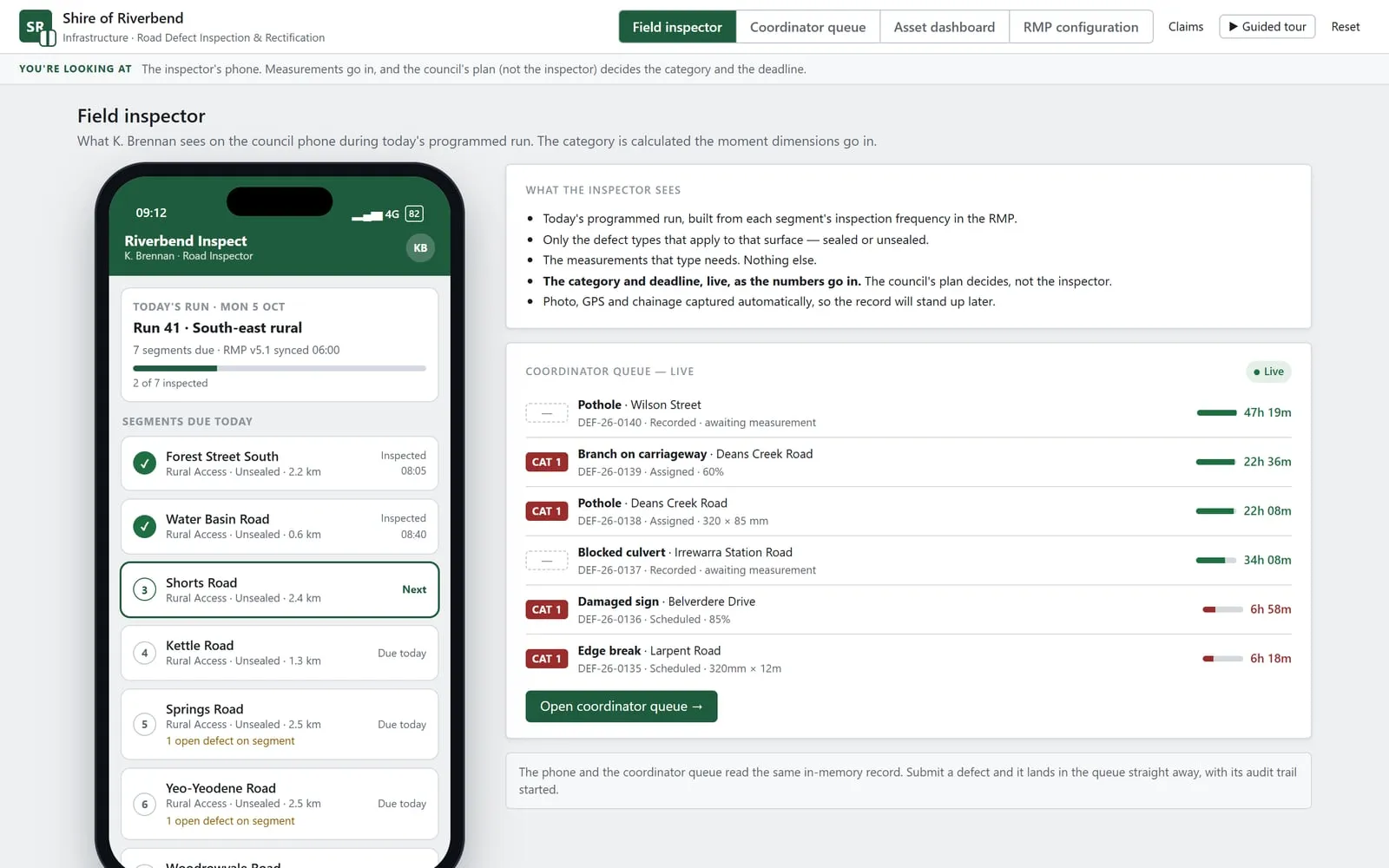
The inspector’s phone. Today’s programmed run, built from each road segment’s inspection frequency in the plan. The inspector only sees the defect types that apply to that surface (sealed or unsealed) and only the measurements that type needs. Here’s my favourite moment: enter a pothole’s dimensions and the category and repair deadline appear, live. The council’s plan decides, not the inspector. Photo, GPS and chainage are captured automatically, and it keeps working offline until the signal comes back.
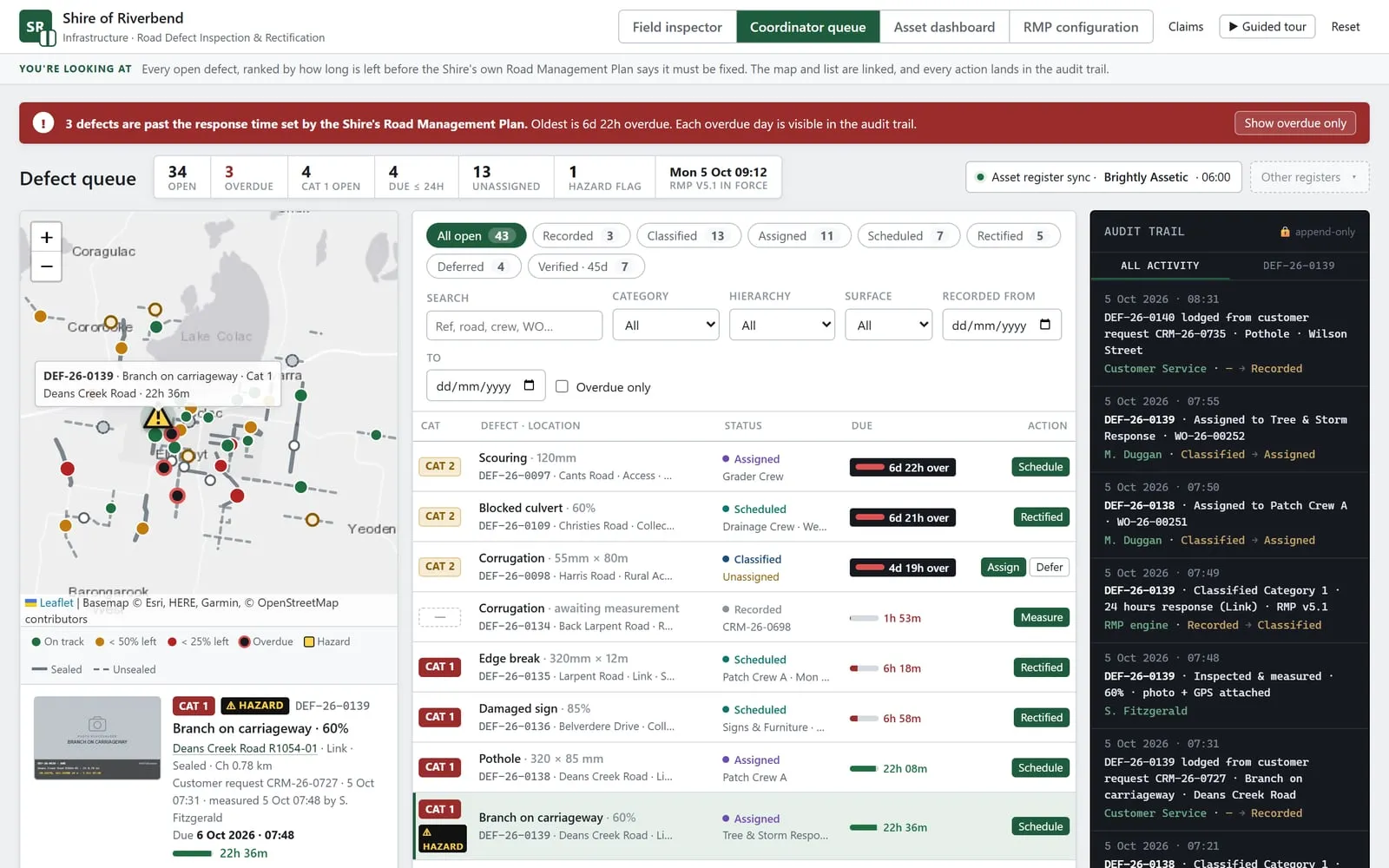
The coordinator queue. Every open defect, ranked by how long is left before the plan says it must be fixed, with a map beside the list. Click one and you see its photo, the exact plan rule that classified it, and what to do next: assign a crew, schedule it, defer it with a reason code, or mark it rectified. Anything overdue is flagged at the top, and every action lands in an append-only audit trail showing who did what, and when.
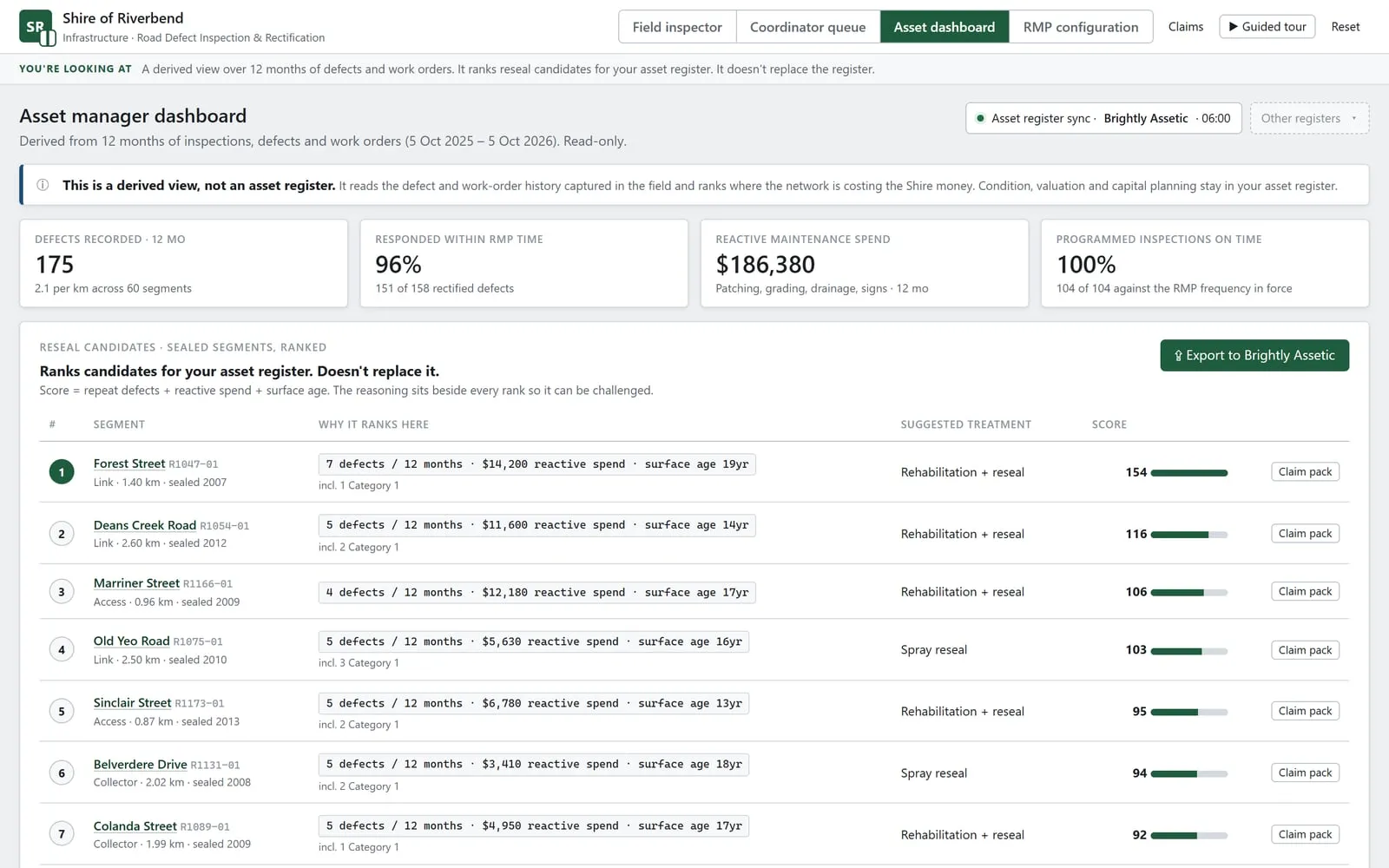
The asset dashboard. Twelve months of inspections, defects and work orders, turned into decisions. Response times against the plan, reactive maintenance spend, programmed inspections on time, and a ranked list of reseal candidates: repeat defects plus reactive spend plus surface age, with the reasoning beside every rank so it can be challenged. It doesn’t replace your asset register. It feeds it, with an export to Brightly Assetic in the demo.
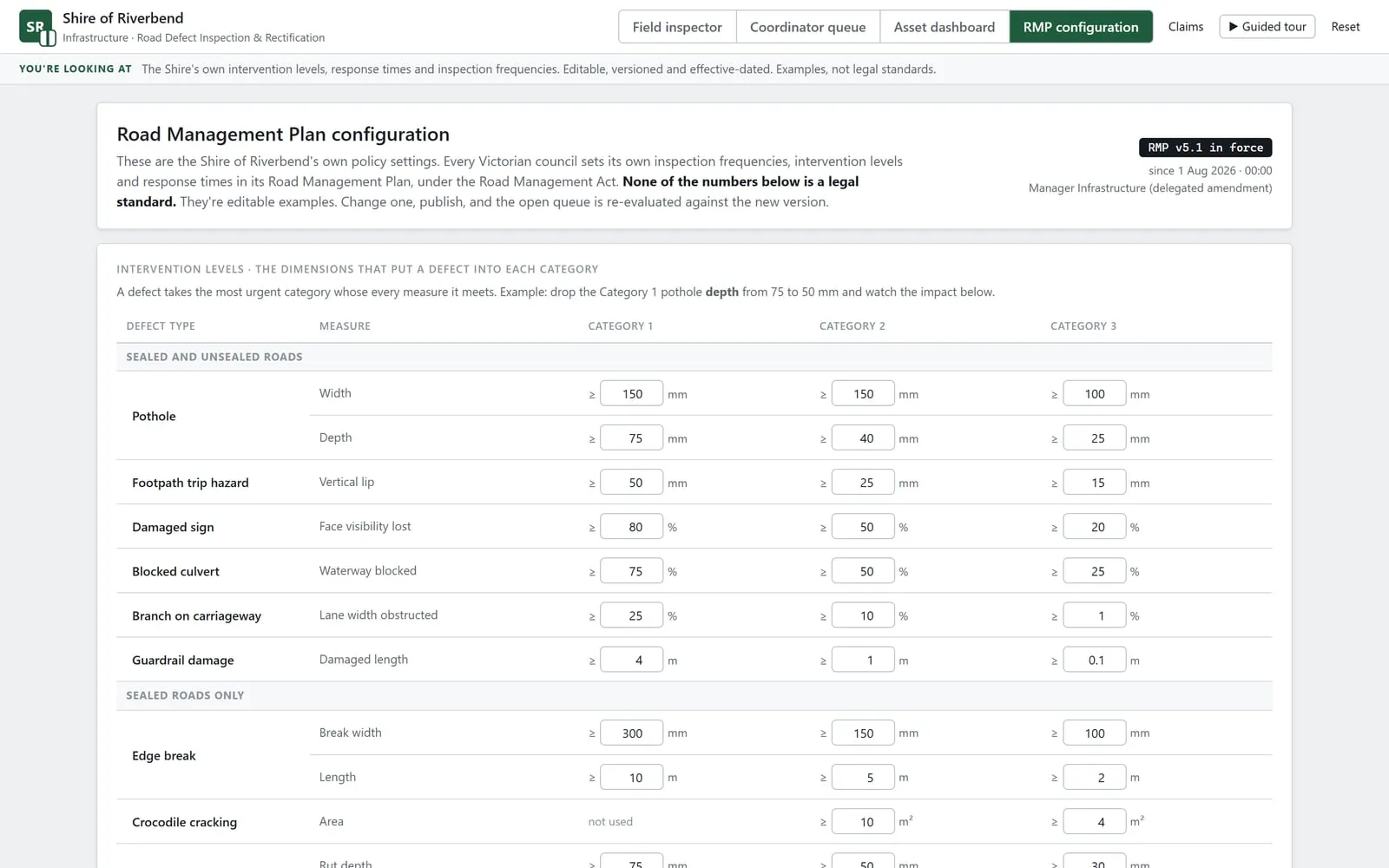
The Road Management Plan, as settings. Intervention levels, response times by category and road hierarchy, inspection frequencies, crews and deferral reason codes. All of it is configuration, not code. Drop the Category 1 pothole depth from 75 to 50 mm and the demo shows you the impact first; publish, and the open queue is re-evaluated against the new version. Every version is kept with its effective date and who approved it.
Why the plan on the day matters
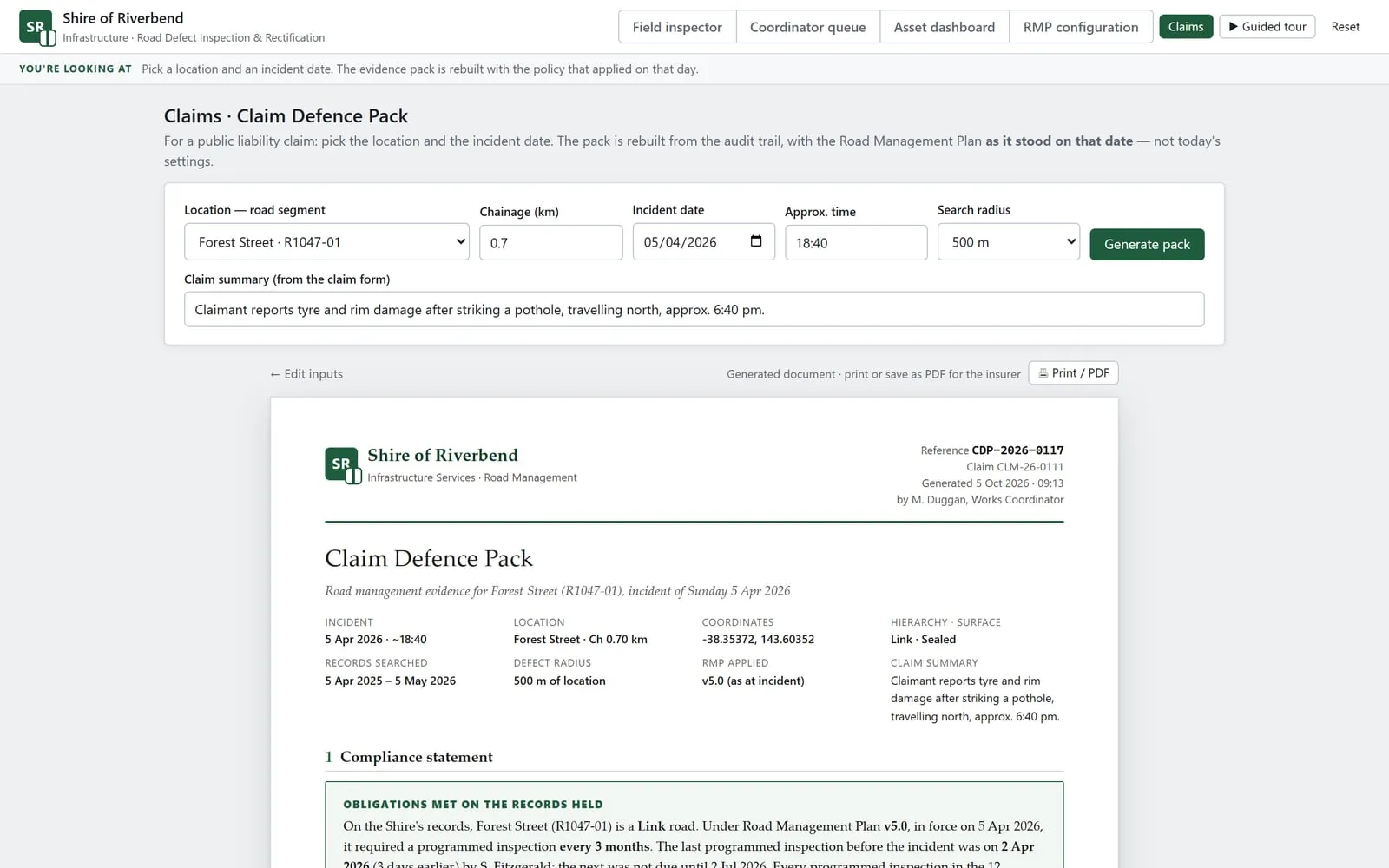
This is the part I’d show your insurer. Pick a road and an incident date, and the system builds a claim defence pack from the audit trail, using the Road Management Plan as it stood on that date. Not today’s settings.
That difference matters more than it sounds. In the demo, a pothole on Forest Street was recorded three days before an incident in April. Under the plan in force at the time, it was Category 2 with a seven-day response, and it was fixed in six. Under today’s tighter plan, the same pothole would be Category 1 with a 24-hour response, and the repair would look late.
Same pothole. Same repair. The only thing that changed was the rulebook, and the pack knows which one applied. It prints as a PDF, ready for the insurer.
Why this matters to your council
Building custom software used to be slow, expensive and risky, which is why so many council processes still run on workarounds. That equation has changed. Our AI-assisted build engine has made us about fifteen times faster than we were a year ago, so a system shaped around your own Road Management Plan is now within reach for councils that couldn’t justify one before.
A mockup isn’t a production system. Real delivery still means security, data handling, integration with your asset register and customer request system, and proper governance. But the gap between “our plan is a PDF” and “our plan runs the work” is a lot smaller than it used to be.
Which part of your road management would you want working first: the inspections, the queue, or the claim pack? Send us a message or call 0411 877 833.